SEPA Return Codes Explained: MS03, AM04, MD06 and What to Do
2026-10-20
It’s the third working day after your monthly collection run. The bank report lists twelve direct debits that came back, each with a four-character code next to it: three MS03, two AM04, one MD01, one AC04. Each code asks for a different response. Some collections can simply go out again next week; others must never be collected again until you have a new mandate or a new IBAN.
SEPA return codes are ISO 20022 reason codes that the debtor’s bank (or a clearing house) attaches to every direct debit it can’t or won’t settle. They come from a list maintained by the European Payments Council, and the EPC publishes official guidance on which code banks should use in each situation (EPC173-14 Guidance on Reason Codes for SDD R-transactions). Read the code first, then decide: re-present, contact the customer, fix your data, or stop.
Where SEPA return codes appear
You’ll usually see the code in one of three places:
- Your online banking, next to the returned item, often with a short description in your bank’s language.
- The payment status report (
pain.002) your bank sends after you upload a direct debit file. It lists rejected transactions before settlement. - The account statement or debit/credit notification (
camt.053/camt.054), which shows returns and refunds after the money has moved.
The code is always the same four characters, whatever the bank. The description next to it is not: one bank writes “insufficient funds”, another “no cover”, a third just “AM04”. Always work from the code, not the wording.
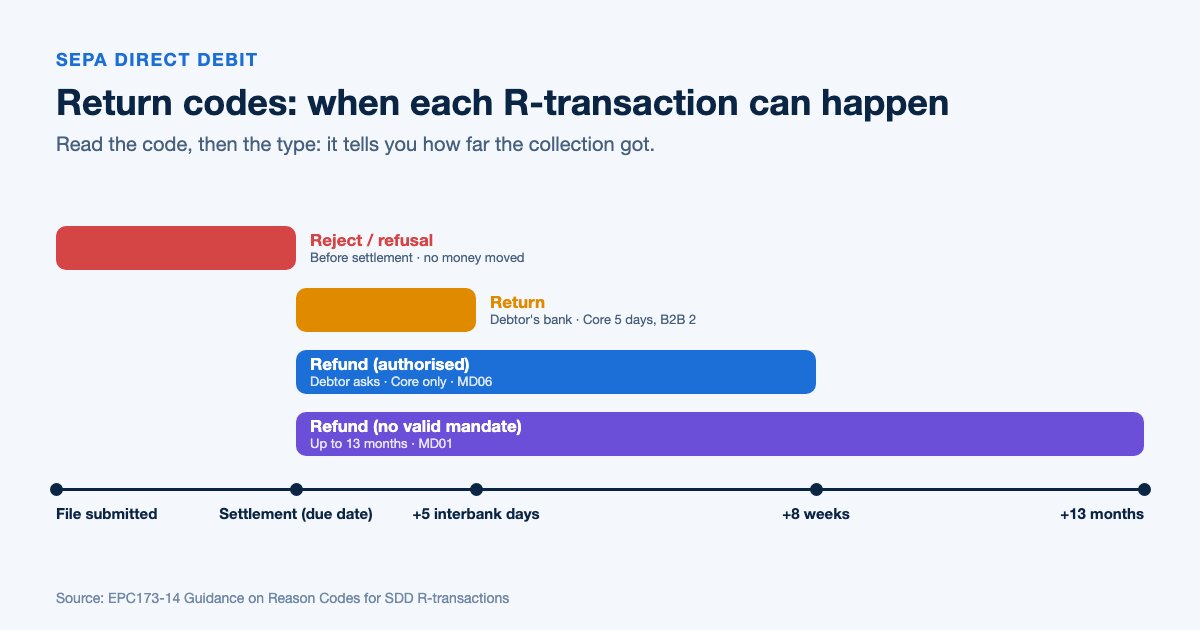
Reject, return, refund: the R-transactions behind the code
A reason code never comes alone. It belongs to an R-transaction, and the type tells you how far the collection got before it failed. The full definitions are in section 4.4 of the EPC rulebooks (SDD Core rulebook and implementation guidelines).
| R-transaction | Who starts it | When | What it means for you |
|---|---|---|---|
| Reject | Your bank, the clearing house or the debtor’s bank | Before settlement | The money never moved. Often a data or file problem. |
| Refusal | The debtor, via their bank | Before settlement | The customer told their bank not to pay this collection. |
| Return | The debtor’s bank | After settlement: up to 5 interbank business days (Core), 2 (B2B) | The bank couldn’t book the debit, e.g. closed account or no funds. |
| Refund | The debtor | Up to 8 weeks for an authorised Core debit, 13 months if unauthorised | The customer asked for their money back. Not available in B2B. |
| Reversal | You (the creditor) | After settlement | You collected by mistake and send the money back yourself. |
Rule of thumb: A reject is usually your data. A return is usually your customer’s account. A refund is always your customer’s decision.
The 8-week refund for authorised Core debits is unconditional: the debtor doesn’t have to give a reason. For B2B direct debits there is no refund right at all, which is one reason the B2B scheme needs the extra mandate check by the debtor’s bank.
SEPA return codes: the complete reference table
These are the codes you’ll meet in practice for SEPA direct debits, based on the EPC guidance. “Re-present” means submitting the collection again as a new item.
| Code | Meaning | Typical cause | Re-present? | What to do |
|---|---|---|---|---|
| AC01 | Incorrect account number | IBAN typo or invalid IBAN | No | Correct the IBAN, then collect again |
| AC04 | Account closed | Customer changed banks | No | Ask for the new IBAN and amend the mandate |
| AC06 | Account blocked | Account blocked for direct debits or frozen | Not until unblocked | Contact the customer; ask for another account |
| AC13 | Debtor account is a consumer account | B2B collection on a private account | No | Switch to a Core mandate |
| AG01 | Transaction forbidden on this account | Account type doesn’t accept direct debits (e.g. savings) | No | Ask for a current account |
| AG02 | Invalid bank operation code | Wrong sequence type or file content | After fixing | Correct the file |
| AM04 | Insufficient funds | Not enough money on the due date | Yes | Re-present once, ideally after telling the customer |
| AM05 | Duplication | Same collection submitted twice | No | Check you haven’t already been paid |
| BE05 | Unrecognised initiating party | Wrong creditor identifier | After fixing | Correct the creditor ID in the file |
| FF01 | Invalid file format | XML doesn’t match the schema | After fixing | Validate and regenerate the file |
| MD01 | No valid mandate | Mandate missing, revoked or not recognised | No | Stop. Get a signed mandate first |
| MD02 | Mandate data missing or incorrect | Wrong mandate reference or signature date | After fixing | Correct the mandate data |
| MD06 | Refund request by end customer | Debtor claimed back an authorised Core debit | Not automatically | Talk to the customer before collecting again |
| MD07 | End customer deceased | Debtor has died | No | Stop collecting; contact the estate |
| MS02 | Reason not specified, customer-generated | Debtor refused the collection | Not without agreement | Contact the customer |
| MS03 | Reason not specified, agent-generated | Bank won’t or can’t say why | Usually yes, once | Re-present once; if it fails again, contact the customer |
| RC01 | Bank identifier incorrect | Wrong BIC | After fixing | Correct or omit the BIC |
| RR01–RR04 | Regulatory reason | Missing debtor or creditor name, address or other required data | After fixing | Complete the missing data |
| SL01 | Specific service offered by the debtor’s bank | Debtor has a block or allow-list on direct debits | After the customer acts | Ask the customer to allow your creditor ID |
The 2025 Core rulebook also adds a code for suspected fraud (FR01). If you receive it, stop and check the mandate before doing anything else.
The codes you’ll see most often
MS03: reason not specified
MS03 is the code that causes the most confusion, and the one people search for most. It means the bank returned the debit but didn’t give a specific reason. Banks use it as a fallback when national law, usually data protection rules, doesn’t allow a more precise code such as AM04 (insufficient funds), AC04 (closed account) or MD07 (deceased). The EPC asks banks to use MS03 sparingly, but in some countries it’s the default.
In practice, MS03 most often hides a lack of funds. Re-present the collection once. If it comes back with MS03 again, contact the customer instead of trying a third time.
AM04: insufficient funds
The account didn’t have enough money on the due date. You may re-present it, but timing matters: a collection that lands the day before payday will fail again. Tell the customer before you try again, and consider moving their collection date.
AC06: account blocked
The account is blocked, either for direct debits only or completely. Re-presenting won’t help until the block is lifted. Ask the customer whether the block is temporary and, if not, for a different account and a new mandate.
MD06: the customer asked for a refund
The debtor used their right to an unconditional refund within 8 weeks of an authorised Core debit. The mandate is still valid, but collecting the same amount again straight away usually ends in another refund. Find out why first: a disputed invoice, a cancelled contract, or a mistake.
MD01: no valid mandate
The debtor’s bank doesn’t recognise a valid mandate, or the debtor claimed the debit was unauthorised (which gives them 13 months to ask for a refund). Never re-present an MD01 return. Check that you have a signed mandate with the same mandate reference you sent in the file, as explained in our guide to the SEPA direct debit mandate.
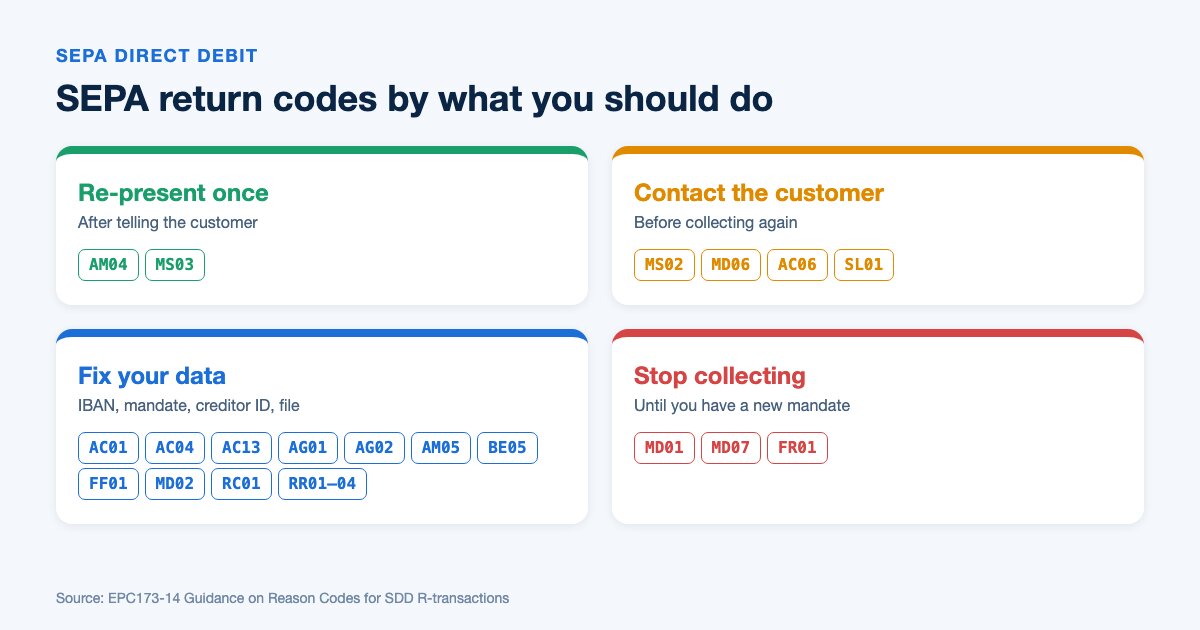
The return codes you can prevent before sending the file
Roughly half of the table above isn’t about your customers at all. It’s about data that was wrong before the file left your system. Those are the codes worth eliminating:
- AC01 and RC01: validate every IBAN (and the BIC, if you send one) before generating the file.
- BE05: check your creditor identifier and use the same one in every file.
- MD01 and MD02: keep one mandate reference per mandate, identical in the mandate PDF and in the XML.
- AM05: never re-upload a file the bank has already accepted.
- FF01 and AG02: validate the XML against the pain.008 schema before uploading.
- RR01–RR04: make sure debtor and creditor names and addresses are complete.
You can check single IBANs with the free IBAN validator, confirm your SEPA creditor identifier, and run any direct debit file through the free SEPA direct debit XML validator before uploading it. For a deeper look at what the validator checks, see our SEPA XML validation guide.
If you prepare your collections in Excel or CSV, GenerateSEPA validates every IBAN while it builds the pain.008 file and keeps the creditor ID and mandate data consistent across runs, which removes most of the preventable codes before the file reaches your bank. It won’t stop an AM04 or an MD06 (those depend on your customers), but it stops you paying return fees for your own typos.
Your action plan for the day a return arrives
| Step | What you do | Codes |
|---|---|---|
| 1. Book the return | Reverse the receivable in your accounts and note the code against the invoice | All |
| 2. Re-present once | Submit a new collection, after telling the customer | AM04, MS03 |
| 3. Contact the customer | Ask what happened before collecting again | MS02, MD06, AC06, SL01 |
| 4. Update the data | New IBAN, amended mandate, corrected creditor ID or BIC | AC01, AC04, AC13, AG01, BE05, MD02, RC01, RR01–RR04 |
| 5. Fix and regenerate the file | Validate the XML before the next run | FF01, AG02, AM05 |
| 6. Stop collecting | Close the mandate until you have a new one | MD01, MD07, FR01 |
| 7. Review monthly | Count returns by code and look for patterns (same bank, same day, same data source) | All |
Returns also cost money: your bank charges a fee for each one, and you may be able to pass a reasonable cost on to the customer if your contract says so. Our guide to returned direct debits covers fees and recovery in more detail, and the R-message glossary entry explains the message types your bank sends.
The codes in your own hands are the cheapest ones to fix. Before your next collection run, put the file through the free SEPA direct debit XML validator and catch them before your bank does.
Frequently Asked Questions
- What does MS03 mean on a SEPA direct debit return?
- MS03 means the debtor's bank returned the collection without giving a specific reason. Banks use it when national rules, usually data protection, don't allow a more precise code. In practice it often means insufficient funds, so re-present once and contact the customer if it fails again.
- What is the difference between a SEPA reject and a return?
- A reject happens before settlement, so the money never moves; it is usually caused by wrong data or a file problem. A return happens after settlement, when the debtor's bank can't book the debit, for example because the account is closed or has no funds. Core returns are allowed up to five interbank business days after settlement.
- Can I re-present a returned SEPA direct debit?
- It depends on the code. AM04 and MS03 can usually be re-presented once as a new collection, ideally after telling the customer. Codes such as MD01, MD07 or AC04 must never be re-presented until you have a valid mandate or new account details.
- How long does a debtor have to ask for a refund of a SEPA direct debit?
- For an authorised SEPA Core direct debit, the debtor can ask for an unconditional refund within 8 weeks of the debit. If the debit was unauthorised, for example without a valid mandate, the deadline is 13 months. B2B direct debits have no refund right.


