SEPA Norm 34 XML file example guide: structure, templates and examples
2026-02-11
SEPA Norm 34 XML file example guide: structure, templates and examples
Although it may seem like something from the past, the Norm 34 file (or AEB 34) is still very present in many management systems that still use it to generate batches. However, here’s what’s important: for banks to be able to process collections, it’s mandatory to convert this file to SEPA XML format. Understanding this change well is key to avoiding returned receipts and ensuring your financial operations don’t stop.
The Norm 34 file and why it needs to be converted to SEPA XML

For many years, Norm 34 (or Notebook 34 of the Spanish Banking Association) was the reference standard in Spain for issuing direct debit batches. We’re talking about a plain text file, with a very rigid and fixed-length structure, designed solely to work within the Spanish banking system.
All this changed with the arrival of the Single Euro Payments Area (SEPA). SEPA’s objective was very clear: unify euro transactions under the same umbrella of rules and technical standards, which in turn greatly facilitated operations between countries.
The mandatory migration to the SEPA XML standard
The format that came to replace Norm 34 for direct debits is SEPA XML, specifically the scheme known as pain.008.001.02. Unlike its predecessor, XML is a much more versatile and complete format, as it’s based on the international ISO 20022 standard.
This change isn’t a suggestion, it’s an obligation. Banks no longer accept files in the old AEB 34 format to process collections. That’s why any company that still generates batches from an ERP or old software must, without fail, convert them to XML format before sending them to the banking entity.
Switching to SEPA, although mandatory, brings with it several important advantages:
- Regulatory compliance: You ensure your batches follow European regulations, which avoids automatic rejections by the bank.
- Fewer errors: The XML format has internal validations and much more specific data fields, such as the mandate identifier, which help reduce typical manual failures.
- Greater efficiency: By unifying everything under the SEPA standard, collection management is simplified, especially if you have customers in other eurozone countries.
If you want to know more about this legacy format, we recommend reading our article about what a Norm 34 file is and why its conversion is so important today.
The anatomy of a SEPA XML direct debit file (Norm 34)
To truly understand how information from an old Norm 34 file is transformed, there’s nothing like getting into the guts of a SEPA XML file example. At first glance, the number of tags and hierarchical structure can be a bit intimidating, but in reality everything follows a very clear and orderly logic.
A SEPA direct debit file (technically known as pain.008.001.02) is organized into three major blocks. Each one has a specific mission: from identifying the batch as a whole to breaking down each individual collection. Mastering this structure is fundamental to knowing if your data has been converted correctly and to being able to solve any problem.
Watch out: a well-built SEPA XML file is your best insurance against returns. It’s estimated that errors in batch generation cost SMEs between 1% and 2% of the total value, including bank commissions and management expenses.
Let’s break down these blocks so you can see what information they contain and, above all, why it’s so important.
Main structure of a SEPA XML file (pain.008.001.02)
To get a general overview, this table summarizes the main blocks you’ll find in any direct debit file. It’s a perfect cheat sheet to quickly identify where each type of information is.
| XML Block (Tag) | Content Description | Key Field Example |
|---|---|---|
GrpHdr (Group Header) |
Contains the global data of the batch. Acts as the file’s cover, identifying the complete set of transactions. | MsgId (Message Identifier) |
PmtInf (Payment Information) |
Groups a set of direct debits under common conditions, such as collection date or creditor account. | ReqdColltnDt (Collection Date) |
DrctDbtTxInf (Individual Transaction) |
Details each individual collection: the amount, the debtor, their bank account, and the associated mandate reference. | InstdAmt (Direct Debit Amount) |
As you can see, the structure goes from general to particular, ensuring that all information is organized logically so banking systems can process it without errors.
The group header block (GrpHdr)
Think of this block as the cover of your batch. It’s the first thing the bank’s system reads and contains the information that identifies the entire set of transactions you’re sending.
Here you’ll find key fields such as:
* Message Identifier (MsgId): A unique code that you assign to the batch yourself. It’s fundamental to be able to track it and differentiate it from any other. Think of it as the invoice number of your entire collection batch.
* Creation Date and Time (CreDtTm): The exact moment the file was generated, with the strict format YYYY-MM-DDThh:mm:ss.
* Number of Transactions (NbOfTxs): The total count of direct debits included in the file. A simple counter.
* Control Sum (CtrlSum): The total amount resulting from adding all direct debits. The bank uses this data as a double verification to ensure no transaction has been lost or modified along the way.
The payment information block (PmtInf)
Right after the header, this second major block appears. Its function is to group transactions that share the same payment conditions. For example, all receipts that will be collected on the same date and from the same bank account of your company will go within the same PmtInf block.
Within this block, the most important data are:
* Payment Information Identifier (PmtInfId): Another unique reference, but this time for this specific group of payments.
* Payment Method (PmtMtd): For direct debits, this field will always contain the value DD (Direct Debit).
* Required Collection Date (ReqdColltnDt): The date you want the bank to charge the receipts to your customers.
* Creditor Data (Cdtr): Here goes your name or company name and your SEPA creditor identifier.
* Creditor Account (CdtrAcct): Your account number in IBAN format.
The individual transactions block (DrctDbtTxInf)
We’ve reached the heart of the file. Nested within each PmtInf block, you’ll find as many DrctDbtTxInf blocks as individual receipts you want to collect. Each one represents a single direct debit to a specific customer.
This is the maximum detail level, where all collection information is specified:
* Direct Debit Amount (InstdAmt): The exact amount that will be charged to the customer.
* Mandate Identifier (MndtId): The unique reference of the SEPA mandate your customer signed authorizing the collection. It’s critical data.
* Mandate Signing Date (DtOfSgntr): The date that authorization was signed.
* Debtor Data (Dbtr): The name and address of the customer being charged.
* Debtor Account (DbtrAcct): The IBAN of your customer’s bank account.
* Receipt Concept (RmtInf): A clear description of the collection, such as “Monthly gym fee” or “Invoice AB-2024-05”.
Field mapping: from Norm 34 to SEPA XML
Moving from classic Norm 34 to the SEPA XML standard is, in essence, like translating a language. It’s about taking the information you already had and placing it in the correct place within a new structure. Understanding this correspondence is fundamental for the migration to go well the first time, without errors that delay your collections.
The main challenge is that there isn’t always a direct equivalence. The SEPA format introduces new fields that simply didn’t exist in Norm 34, especially those related to direct debit mandate management. For example, data as important as the mandate signing date is mandatory in SEPA, but wasn’t contemplated in the old AEB 34 format.
Field correspondence Norm 34 vs. SEPA XML
To give you a clear idea of how this “translation” works, I’ve prepared a reference table. Here you can see at a glance where each piece of data from your original file goes when you convert it to SEPA XML. It’s a perfect cheat sheet for quickly resolving doubts.
| Field in AEB Norm 34 | Corresponding XML Tag in SEPA | Important Notes |
|---|---|---|
| Ordering Party NIF | <Id><OrgId><Othr><Id> within Cdtr |
Identifies the company issuing the collection. |
| Debtor Account | <DbtrAcct><Id><IBAN> |
The format changes from CCC to IBAN, which is mandatory in SEPA. |
| Receipt Amount | <InstdAmt> |
Must be specified with the currency, for example, <InstdAmt Ccy="EUR">. |
| Direct Debit Reference | <MndtId> |
Becomes the unique SEPA mandate identifier. |
| Receipt Concept | <RmtInf><Ustrd> |
It’s the text the customer will see on their bank statement. |
As you can see, the logic is quite straightforward for basic fields. The real change comes with the information SEPA adds to give more security and traceability to operations. For example, if you’re still working from accounts in the legacy CCC format, you’ll first need to convert them to IBAN with our free generator before placing them into the new file.
New fields and key considerations
Beyond direct equivalence, the SEPA XML format will ask you for additional data. Ignoring these new requirements is the number one reason banks reject batch files. Pay attention, because they’re mandatory.
The most important data you’ll have to add that weren’t in Norm 34 are:
- SEPA Creditor Identifier: It’s a unique code that identifies you as a direct debit issuer throughout the SEPA zone. If you don’t have it, your bank must provide it to you.
- Mandate Signing Date (
DtOfSgntr): The exact date your customer signed the authorization. This field is absolutely essential. - Sequence Type (
SeqTp): Serves to indicate whether the collection is recurrent (RCUR), the first in a series (FRST), the last (FNAL), or a one-off payment (OOFF).
Correct mapping is the foundation for conversion to work. Tools like ConversorSEPA do all this work for you. They interpret your Excel, CSV, or Norm 34 file, place each piece of data in its corresponding XML tag, and add the new fields to generate a valid SEPA file instantly.
Templates and example files to download
So you can start working and understand the entire process practically, we’ve prepared a package of ready-to-download resources. With these files, you’ll see very clearly how you go from the original data to the final file presented to the bank.
Here you have a Norm 34 SEPA XML file example at each of its stages. It will serve you to compare the different structures, test in your own programs, or simply use them as a starting point to generate your own batches.
The files you can download are as follows:
- Original Norm 34 file: A plain text file (
.txt) that’s a typical example of what an ERP or older management system would generate. - Excel/CSV data template: Contains exactly the same information as the previous batch, but organized in a spreadsheet, much more comfortable to handle and edit.
- Final SEPA XML file: The
.xmlfile obtained after conversion, already validated and with the correct format for any bank to process.
This diagram summarizes the conversion flow very well, starting from an N34 file to reach its SEPA XML equivalent.
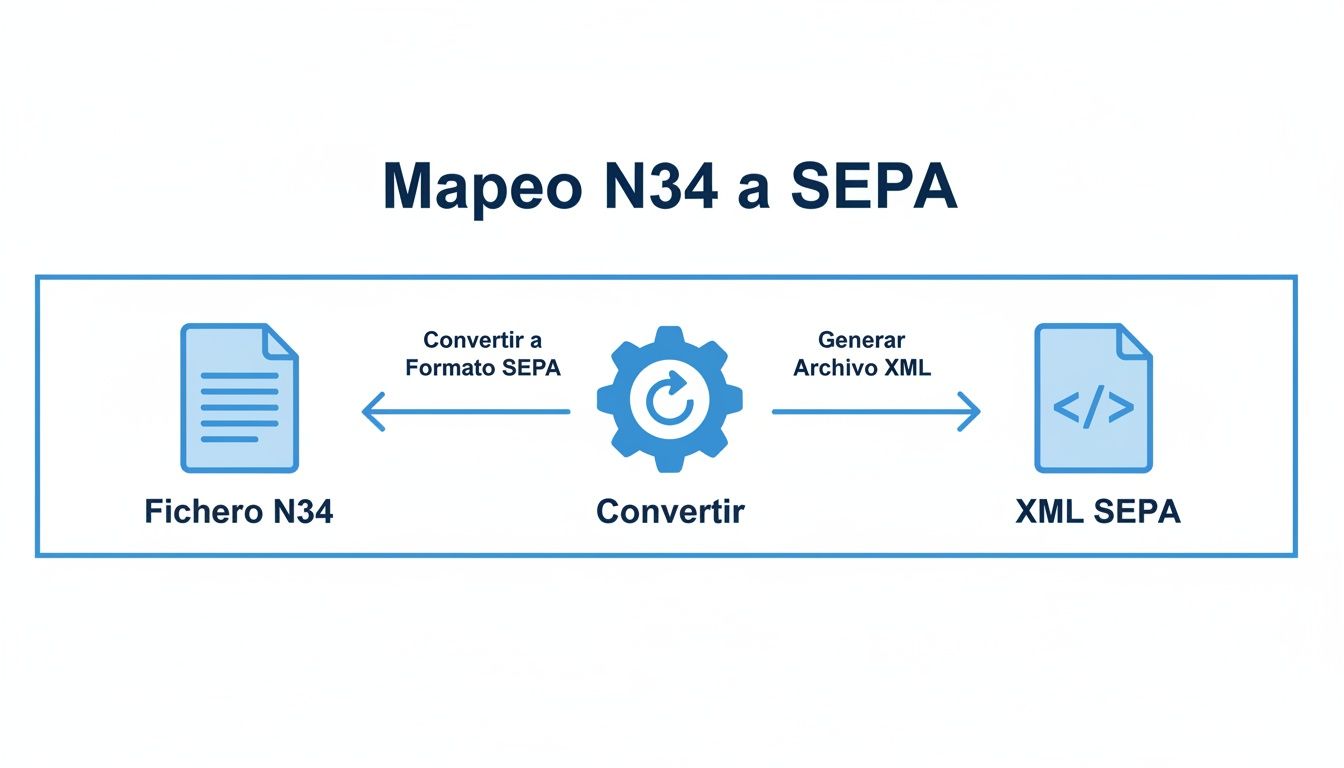
As you can see, the graph makes it clear how simple the process is if you use an appropriate conversion tool. It’s ultimately about transforming a format that has already become obsolete into the XML standard that banks require. If you need more details, I recommend taking a look at the file formats you can upload to convert.
Common errors and key validations when generating XML

Creating a Norm 34 SEPA XML file example without errors the first time is the ideal, but the reality is that errors are the order of the day. A small oversight is enough for the bank to reject the entire batch, which translates into delays in collections and, of course, administrative costs you hadn’t anticipated.
These problems usually arise from overlooked details, either in the source data or in the file structure itself. The good news is that most are typical failures, easy to foresee and therefore avoid. That’s why it’s crucial to perform a series of validations before approving the file and sending it.
Think of these checks as a quality control checklist. Reviewing them will save you time, money, and the frustration of having to correct and resend batches.
Essential validations before sending
Before uploading your XML file to online banking, don’t take risks. Make sure these critical points are perfect, because a failure in any of them is almost certainly a reason for rejection.
- IBAN format: Seems obvious, but it’s one of the most frequent errors. Verify that all IBANs are correct, including the country code (ES for Spain) and its two control digits. A single incorrectly formatted IBAN and the associated transaction will be invalidated.
- Control sum (
CtrlSum): Pure mathematics. The total amount you indicate in the group header (GrpHdr) must be exactly the sum of all individual transaction amounts (InstdAmt). Any discrepancy, even of one cent, will trigger the bank’s alarms. - Date consistency: The collection date (
ReqdColltnDt) must always be a future and realistic date. Don’t forget the submission deadlines your bank requires; for example, for CORE direct debits it’s common to have to send the batch at least D-2 business days in advance. - Unique identifiers: The
MsgId(the message’s ID card) and thePmtInfId(the identifier of each payment block) must be unique for each batch. If you reuse identifiers from previous shipments, you risk the system interpreting it as a duplicate and rejecting it outright.
A practical tip: Automatic validation is your best ally in this process. Instead of going crazy reviewing hundreds of lines of code manually, tools like ConversorSEPA analyze the file in seconds. They detect these errors and many others before they reach the bank. This not only prevents returns but also cuts the operational costs generated by incident management.
Having a good validator gives you the peace of mind that your file is technically solid, allowing you to focus on what really matters: managing your business, not solving technical problems.
Automate file conversion with ConversorSEPA API
Generating batches manually is a slow, repetitive task and, let’s be honest, a constant source of errors that ends up costing time and money. If you really want to optimize the creation of a Norm 34 SEPA XML file example or any other batch, automation is the only way. At ConversorSEPA we make it easy for you with two solutions that perfectly adapt to your team, whether administrative or more technical.
For the day-to-day of finance and administration departments, our web platform is the perfect tool. It’s as simple as uploading a file in Excel, CSV, or even the old Norm 34 format. In seconds, you have your validated SEPA XML file ready to send to the bank. The entire process is very visual and intuitive, without needing to fight with the technical complexity of XML.
It’s the most direct and controlled way to manage batches.
The interface is clean and clear: you select your source file and the conversion takes care of the rest.
Full integration for developers with JSON API
Now, if what you’re looking for is maximum efficiency, the key is to integrate batch generation directly into your systems, whether an ERP, CRM, or custom software. And this is where the ConversorSEPA JSON API comes into play and makes a big difference. We offer developers a solid and reliable endpoint to automate the entire conversion process from start to finish.
What does this mean in practice? That files can be generated and validated without anyone having to intervene manually. Your system sends the batch data to our API and receives back the SEPA XML file, already corrected and ready to use. This integration not only saves an enormous amount of time but also guarantees that everything is consistent, reducing errors practically to zero. If you want to know the technical details, you can consult our guide on how to use the ConversorSEPA API.
“Automation through an API isn’t just an efficiency improvement; it’s a strategic advantage. It allows companies to scale their collection operations without proportionally increasing their administrative burden, freeing the team to focus on higher-value tasks.”
The numbers don’t lie: the volume of digital transactions keeps increasing. Just in the first half of 2025, SEPA transfers in Spain grew 12.7% to reach 1.584 billion operations, while direct debits totaled 1.143 billion. This massive volume highlights the need for automation tools like ours, which convert legacy formats like Norm 34 to the required XML. This avoids errors that, according to sector estimates, can cost SMEs between 1-2% of the total batch value. You can read more about this growth at Europa Press.
Security and flexibility in automation
When it comes to banking data, security is non-negotiable. At ConversorSEPA we take it very seriously and protect your information with multiple layers of security:
- Data encryption: All communication, both with the API and the web platform, travels completely encrypted.
- Automatic deletion: The files you upload and the results we generate are permanently deleted from our servers in just 10 minutes. We don’t keep anything.
- Format flexibility: Our API is designed to be flexible and understand the particularities of different source files, adapting to what each company needs.
This combination of simplicity for business users and power for developers is what makes ConversorSEPA the ideal solution for modernizing and securing your batch management.
Frequently asked questions about Norm 34 files and SEPA XML
To round out this guide on how to move from Norm 34 to the SEPA standard, I’ve wanted to compile the most common doubts you’ll encounter day to day. Think of it as a cheat sheet with quick, clear, and to-the-point answers, so you don’t get stuck.
Here you’ll find solutions to typical problems: from understanding what the heck differentiates one format from another, to knowing how to react when the bank sends a batch back. It’s the ideal complement to always have on hand.
What’s the main difference between a Norm 34 file and a SEPA XML?
The big difference is in their structure and where they work. The Norm 34 file is a plain text format, old-school, with a fixed length for each line. It was designed to work only within Spain and, let’s be honest, it’s a technology that’s already very outdated.
In contrast, a SEPA XML file is a European standard based on the international ISO 20022 standard. Its structure uses tags, like a web page, which gives it enormous flexibility and allows including much more information. Today, SEPA XML is the only format banks accept to process direct debits throughout the Single Euro Payments Area.
What exactly is the mandate identifier in a SEPA file?
The mandate identifier, which in the XML file you’ll see as <MndtId>, is nothing more than a unique reference for the collection authorization your customer signed. It’s, so to speak, the ID card of that permission.
You as a company put this reference, and it cannot be repeated for the same combination of customer and contract. It’s a vital field that you must keep safe along with the signing date, because both pieces of data are mandatory in each collection you launch.
For reference, in the old Norm 34 this data was called “Direct debit reference”. The key now is that with SEPA, the management and tracking of these mandates are much stricter.
Why did my bank reject a SEPA XML file?
Having the bank return a batch is annoying, but the good news is that it’s almost always due to format or data errors that can be easily avoided. The most common causes of rejection are:
- IBAN errors: A miscalculated control digit or an invalid format and that transaction is out immediately.
- Accounts don’t balance: If the total amount you put in the header (
CtrlSum) doesn’t match the sum of all direct debits, the bank will reject the entire file. - Incorrect date format: All dates must go in
YYYY-MM-DDformat. No exceptions. - “Strange” characters: Using “ñ” or any other non-standard symbol can cause problems if the file isn’t correctly encoded in UTF-8.
- Missing mandate data: Forgetting the mandate identifier or its signing date is a critical error that invalidates the collection.
The smartest thing is to use an automatic validator or a specialized tool before sending anything to the bank. It’s the best way to catch these failures and ensure the batch goes through the first time.
What’s the difference between the SEPA CORE and B2B scheme?
When you prepare a direct debit file, you have to choose between two schemes. The decision depends on who you’re going to charge.
- CORE scheme: It’s the basic one and the one used 99% of the time. It works for charging any customer, whether an individual, freelancer, or company. What’s important is that it offers a return period of up to 8 weeks without giving explanations, and up to 13 months if the collection wasn’t authorized.
- B2B scheme (Business-to-Business): As its name indicates, it’s designed only for charging other companies or freelancers. Its big difference is that the customer waives the right to return. This makes the deadlines for submitting collections shorter, but in exchange it requires you to maintain much stricter control of mandates.
Related tool: Want to be sure a pain.008 file is well-built before uploading it to the bank? Drop it into our free SEPA Direct Debit XML validator and you’ll see the list of errors with the exact line number in under a second.
Tired of fighting with the complexity of SEPA files and bank rejections? With ConversorSEPA, you can transform your Excel, CSV, or Norm 34 files into a validated XML ready to send in seconds. Automate your batches and save time and headaches. Try ConversorSEPA for free and simplify your collections starting today.
Frequently Asked Questions
- What is the main difference between a Norma 34 file and a SEPA XML file?
- The Norma 34 file is a fixed-length plain text format designed to work exclusively within the Spanish banking system. A SEPA XML file, specifically in the pain.008.001.02 schema, is a European standard based on the international ISO 20022 norm that uses structured tags and works across the entire Single Euro Payments Area. Unlike Norma 34, the XML format requires mandatory fields that the old standard did not include, such as the mandate identifier and the mandate signature date. Spanish banks no longer accept Norma 34 files for processing direct debits: SEPA XML is the only valid format currently accepted.
- What is the mandate identifier and why is it mandatory in SEPA?
- The mandate identifier, which appears in the XML file as the MndtId tag, is the unique reference that identifies the collection authorisation the customer signed. It is, in practical terms, the reference number for that direct debit permission. The company assigns it and it must not be repeated for the same customer-and-contract combination. SEPA makes it mandatory because European regulation strengthens debtor rights: if a customer disputes a charge, the bank needs that identifier to verify that the authorisation existed. Without it, the transaction is invalidated and the bank rejects the collection.
- Why does the bank reject a SEPA XML file even when the data looks correct?
- The most common rejections are caused by detail-level errors that are not visible at a glance. The most frequent include: an IBAN with an incorrect check digit or hidden spaces, a control sum in the file header that does not match exactly the sum of all individual transaction amounts, a collection date in a format other than the YYYY-MM-DD the standard requires, message or batch identifiers reused from a previous submission, and missing or incomplete mandate data. Using an automatic validator before sending the file to the bank is the most effective way to catch these issues and prevent an entire remittance from being rejected over an avoidable error.
- What is the difference between the SEPA CORE and B2B schemes?
- The CORE scheme is the universal standard and can be used to collect from any customer, whether an individual, sole trader, or company. Its defining feature is that it grants the debtor the right to request a refund without justification for up to eight weeks after the charge, or up to thirteen months if the payment was never authorised. The B2B scheme is designed exclusively for transactions between businesses. When a business debtor signs a B2B mandate, they waive that automatic refund right. In return, the submission lead times are shorter, but the creditor must maintain a more rigorous mandate control process. The B2B scheme must never be used to collect from individual consumers.
- How do I convert an old Norm 34 file to SEPA XML?
- The most practical approach is to export the data to Excel or CSV and use a SEPA converter that generates pain.008. This adds fields Norm 34 did not include, such as mandate reference and signature date, with prior validation.
- Which pain.008 version should I use for direct debits in Spain?
- In Spanish practice, pain.008.001.02 is used for direct debit batches. Check with your bank whether it requires a specific variant before your first production submission.
- Can I create a SEPA XML file from Excel without coding?
- Yes. Tools like ConversorSEPA map Excel or CSV columns to mandatory XML fields and validate IBANs, totals and mandates before export. You do not need to edit the XML by hand.